Registries
Registries let CAPA connect to any third-party skill or plugin catalog. That includes public marketplaces like skills.sh and the Cursor Marketplace, as well as private company registries behind a VPN.
Each registry is a single TypeScript adapter file that you drop into ~/.capa/registries/. CAPA picks it up at startup and exposes it through the web UI (under a new Registries tab) and the CLI (capa add <registryId>:<itemId>).
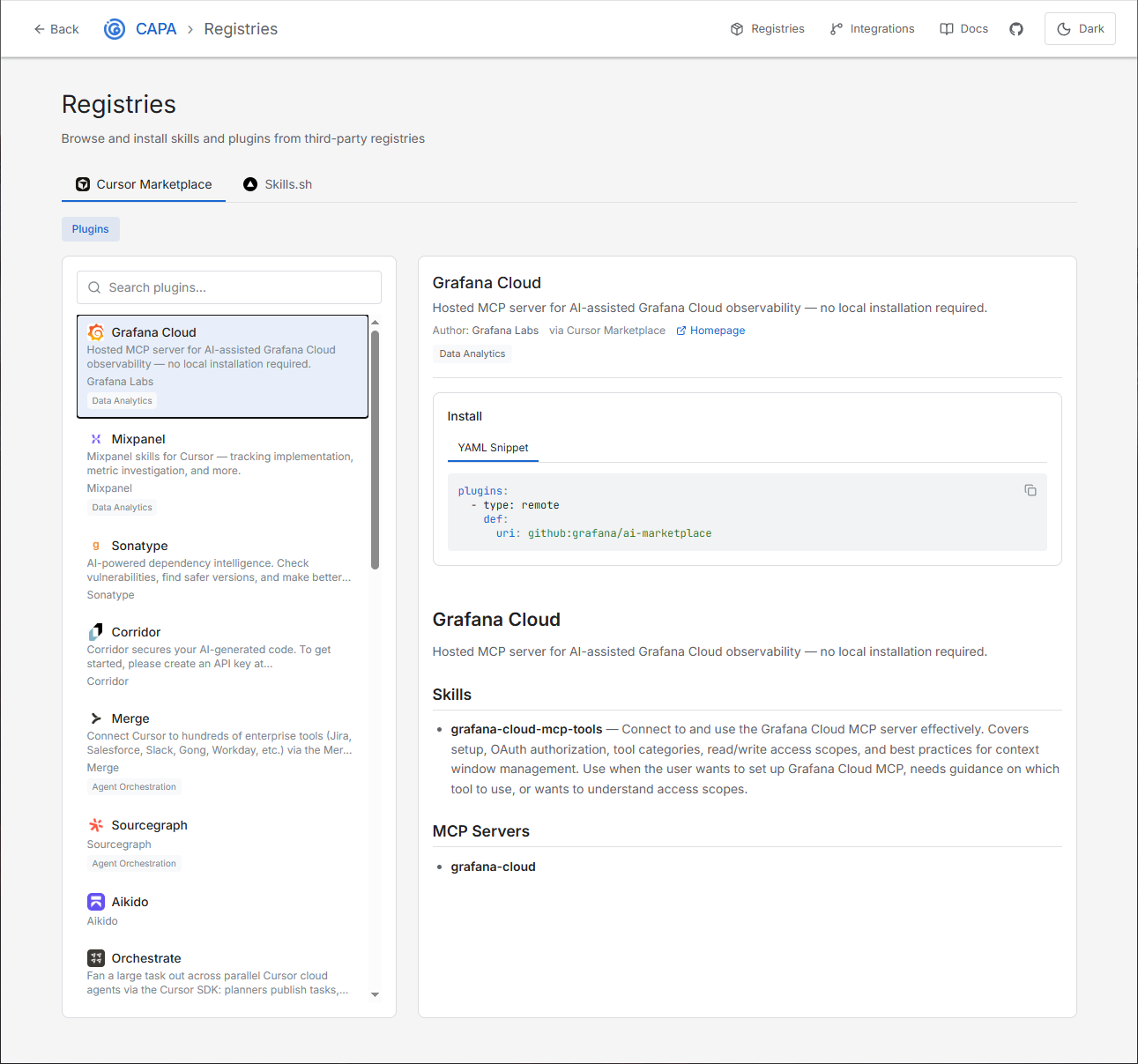
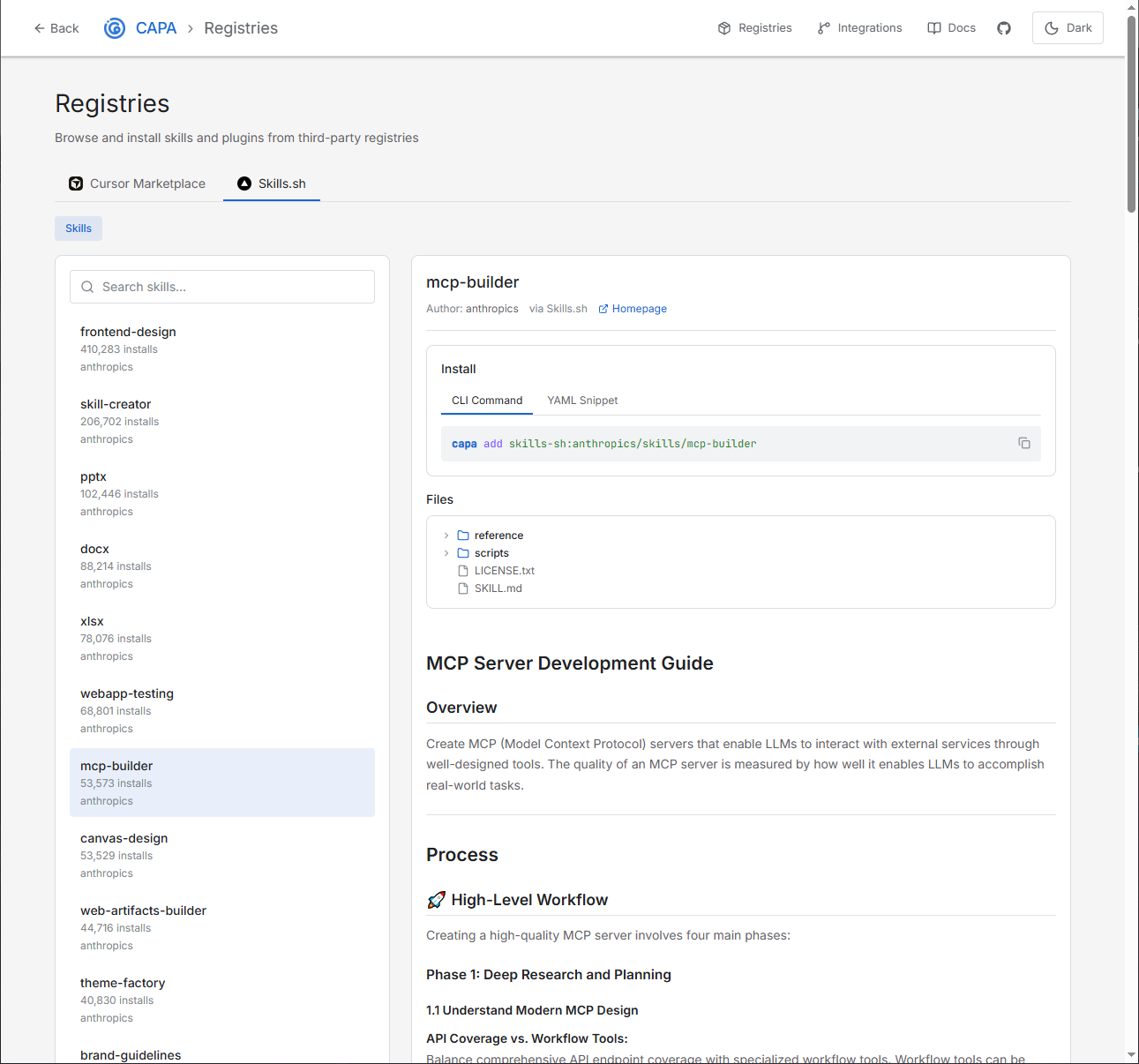
capa add commands.Quick Start
CAPA ships two example adapters in the capa repository:
skills-sh.ts: browse and install skills from skills.sh.cursor-marketplace.ts: browse and install plugins from the official Cursor Marketplace.
Copy one (or both) into your registries directory and restart CAPA:
# macOS / Linux
mkdir -p ~/.capa/registries
cp registries/skills-sh.ts ~/.capa/registries/
cp registries/cursor-marketplace.ts ~/.capa/registries/

# Windows (PowerShell)
New-Item -ItemType Directory -Force -Path $env:USERPROFILE\.capa\registries
Copy-Item registries\skills-sh.ts $env:USERPROFILE\.capa\registries\
Copy-Item registries\cursor-marketplace.ts $env:USERPROFILE\.capa\registries\

capa restart
Open the web UI. A Registries tab appears in the navigation bar, with a sub-tab for each adapter you loaded.
Installing Items
From the Web UI
- Open the Registries tab.
- Select a registry (Skills.sh, Cursor Marketplace, your private registry).
- If the registry supports multiple capabilities (skills and plugins), pick a tab.
- Search for an item. Results appear as cards with author, version, tags, and a markdown preview.
- Click an item to open the detail pane. You'll see:
- Full
SKILL.md(or plugin readme) rendered as sanitized Markdown. - The list of files that will be installed.
- A CLI install snippet (
capa add ...) and a YAML snippet forcapabilities.yaml.
- Full
- Paste the YAML snippet into your capabilities file (or run the CLI snippet) and then
capa install.
From the CLI
Use the registry syntax <registryId>:<itemId>:
# Install a skill from skills.sh
capa add skills-sh:web-researcher

# Install a plugin from the Cursor Marketplace
capa add cursor-marketplace:anthropic/claude-helpers

# Use a custom ID
capa add skills-sh:web-researcher --id my-researcher
CAPA looks up <itemId> in the named registry, fetches the install snippet via the adapter's view() function, adds it to your capabilities file, and runs capa install automatically.
Note: The following prefixes are reserved by the source parser and will never be interpreted as registry IDs, even if you happen to name a registry the same thing: github:, gitlab:, bitbucket:, npm:, file:, http:, https:.
Managing Registries
Use the capa registry command to inspect what's loaded:
# List all configured registries
capa registry list

# Print the registries directory path
capa registry path

# Shortcut: 'capa registry' without subcommand also lists
capa registry
How Registry Adapters Work
An adapter is a plain TypeScript object exported as default. It has three parts: a manifest, a search() function, and a view() function.
interface RegistryAdapter {
  manifest: RegistryManifest;
  search(args: RegistrySearchArgs): Promise<RegistrySearchResult>;
  view(args: RegistryViewArgs): Promise<RegistryItemDetail>;
}
Manifest
Declares metadata and which capabilities the registry serves:
interface RegistryManifest {
  id: string;              // unique identifier (e.g. "skills-sh")
  name: string;            // display name shown in the UI
  description?: string;
  homepage?: string;
  icon?: string;
  capabilities: RegistryCapability[];  // ["skills"], ["plugins"], or both
}

type RegistryCapability = 'skills' | 'plugins';
The capabilities array determines which sub-tabs appear under the registry in the UI. If your registry only serves plugins, set capabilities: ['plugins'] and the Skills tab won't be shown.
search()
Called on every debounced keystroke in the search bar. Should be lightweight and fast:
interface RegistrySearchArgs {
  capability: RegistryCapability;  // which tab the user is on
  query?: string;                  // the search text (may be empty)
  limit?: number;
}

interface RegistrySearchResult {
  items: RegistryItemSummary[];
  total?: number;
  nextCursor?: string;
}
view()
Called when the user opens an item. May make additional upstream calls (e.g. fetching the full SKILL.md):
interface RegistryItemDetail extends RegistryItemSummary {
  preview: string;                 // markdown body rendered in the UI
  installSnippet: Skill | Plugin;  // pasted into capabilities.yaml on install
  files?: string[];                // files that will be installed
}
The installSnippet is what gets added to the user's capabilities file. For skills it typically looks like:
installSnippet: {
  id: 'my-skill',
  type: 'github',
  def: { repo: 'owner/repo@skill-name' }
}
For plugins:
installSnippet: {
  type: 'remote',
  def: { uri: 'github:owner/repo' }
}
Writing Your Own Adapter
Here's a minimal adapter that wraps a fictional company-internal API:
type RegistryCapability = 'skills' | 'plugins';

interface RegistryManifest {
  id: string;
  name: string;
  description?: string;
  capabilities: RegistryCapability[];
}

interface RegistryItemSummary {
  id: string;
  capability: RegistryCapability;
  title: string;
  description?: string;
  author?: string;
  version?: string;
  tags?: string[];
}

interface RegistryItemDetail extends RegistryItemSummary {
  preview: string;
  installSnippet: Record<string, unknown>;
  files?: string[];
}

const adapter = {
  manifest: {
    id: 'my-registry',
    name: 'My Registry',
    description: 'Internal skill registry',
    capabilities: ['skills'] as const,
  },

  async search({ capability, query }: { capability: RegistryCapability; query?: string }) {
    if (capability !== 'skills') return { items: [] };
    const res = await fetch(`https://registry.example.com/api/search?q=${query ?? ''}`);
    const data = await res.json();
    return {
      items: data.results.map((r: any) => ({
        id: r.id,
        capability: 'skills' as const,
        title: r.name,
        description: r.summary,
        author: r.author,
      })),
      total: data.total,
    };
  },

  async view({ id }: { capability: RegistryCapability; id: string }) {
    const res = await fetch(`https://registry.example.com/api/items/${id}`);
    const data = await res.json();
    return {
      id,
      capability: 'skills' as const,
      title: data.name,
      description: data.summary,
      author: data.author,
      preview: data.readme,
      installSnippet: {
        id: data.slug,
        type: 'github',
        def: { repo: `${data.owner}/${data.repo}@${data.slug}` },
      },
    };
  },
};

export default adapter;
Drop the file into ~/.capa/registries/my-registry.ts and run capa restart. Bun transpiles the TypeScript on the fly, so there's no build step.
Security & Sandboxing
Registry adapters run as TypeScript modules inside the CAPA server process, so they have full access to the network and filesystem. Only install adapter files from sources you trust. CAPA prints a reminder of this every time you run capa registry list.
CAPA defends against malicious upstream registry data with a few layers of protection:
- HTML escaping. Every string supplied by the registry is escaped before it touches the DOM.
- DOMPurify sanitization. Markdown previews are sanitized so a hostile registry can't inject XSS.
- Reserved URI prefixes.
github:,gitlab:,bitbucket:,npm:,file:,http:, andhttps:can never collide with registry IDs. - Multi-capability probing. The CLI tries each capability your adapter declares. Ambiguous IDs fail loudly instead of silently installing the wrong type.
- Per-call timeouts.
search()andview()each have a 15-second budget.
Tips
- Cache aggressively. Adapters with slow upstreams should keep an in-memory cache. The
cursor-marketplace.tsexample uses a 5-minute TTL. - Return early for unsupported capabilities. If your adapter only serves
'skills', return{ items: [] }fromsearch()when called with'plugins'. - Adapter
idmust be unique. If two files declare the sameid, the second is skipped. - CAPA caches by file mtime. Editing an adapter triggers a reimport on the next load cycle. For a fully clean reload, restart the server.
- URL state in the UI. The registries page persists the selected registry, capability, search query, and selected item in the URL, so browser back/forward navigation works and links are shareable.
Reference Adapters
| File | Registry | Capabilities | Notes |
|---|---|---|---|
skills-sh.ts | skills.sh | Skills | Server-side search via API |
cursor-marketplace.ts | Cursor Marketplace | Plugins | Client-side filtering with 5-minute in-memory cache |
Related Documentation
- capa registry: inspect configured registries.
- capa add: install items from registries by ID.
- Plugins: plugins resolved at install time.
- Skills: skill types and definition.